Types of Software We Build: A Simple Guide to Choosing the Right One (2026)
A concise look at the different kinds of software businesses actually need in 2026 — from websites and web apps to mobile apps, SaaS products, automation tools, and custom internal systems — and how to know which one fits your business.

Not All Software Is the Same Problem
"We need software" is where most projects start — but it's rarely specific enough to actually build from. A marketing website, a customer dashboard, and an internal inventory tracker are three completely different problems with three completely different builds. Picking the wrong one wastes time and budget before a single line of useful code gets written.
Here's a quick breakdown of the main kinds of software we build, what each one is actually for, and how to know which one fits your situation.
1. Websites
A website's job is simple: present your business and convert visitors into leads or customers. No logins, no complex user actions — just fast, clear, well-designed pages that tell people who you are and what to do next.
- Company and portfolio websites
- Landing pages for products or campaigns
- Marketing sites built for SEO and lead generation
If your goal is visibility, credibility, and getting found on Google, this is where you start — and it's usually the fastest, most affordable build.
2. Web Applications
A web app is what a website becomes once users need to log in and do something — not just read, but interact. Dashboards, bookings, data entry, workflows. This is where real product logic lives.
- Customer dashboards and account portals
- Booking and scheduling systems
- Admin panels for managing business operations
- Full SaaS products used by paying customers
Web apps are the backbone of most modern products because they run in any browser, update instantly for every user, and don't require an app store approval process to ship a fix.
3. Mobile Apps
Mobile apps make sense when your product depends on something a browser can't reliably do — push notifications, offline access, camera, GPS, or a habit-forming daily-use experience that lives on a home screen.
- Consumer apps built for daily engagement
- Apps needing device features (camera, location, notifications)
- Products where offline functionality genuinely matters
They're a bigger investment than a website or web app, so they work best once you've already validated that people want your product.
4. SaaS Products
SaaS is a web app with a business model attached — a product built to be sold to many customers on a recurring subscription, each with their own account, data, and usage limits.
- Multi-tenant platforms with separate customer accounts
- Subscription billing and plan management built in
- Usage tracking and tiered feature access
This is the right category when your goal isn't a one-off product for your own business, but a product other businesses will pay to use.
5. Automation Tools
Not every problem needs a full product — sometimes it just needs the manual, repetitive parts of your workflow removed. Automation tools connect the systems you already use and remove the human copy-paste in between.
- Connecting your CRM, forms, email, and notifications together
- Auto-generating reports, invoices, or reminders
- Routing leads, tickets, or orders without manual triage
These are often the fastest wins — a few days of work removing hours of weekly manual work permanently.
6. Internal Systems and Custom Tools
Sometimes an off-the-shelf tool almost fits your process — but not quite. That gap is where custom internal software earns its cost: purpose-built around exactly how your team actually works, instead of bending your process to fit someone else's software.
- Inventory and order management systems
- Internal reporting and analytics dashboards
- Workflow tools specific to your industry or process
These don't need to look polished for the public — they need to be fast, reliable, and exactly right for the people using them every day.
How to Choose the Right One
| If you need to... | Build this |
|---|---|
| Get found online and generate leads | Website |
| Let users log in and interact with data | Web app |
| Reach users on their phones specifically | Mobile app |
| Sell your product to many paying customers | SaaS product |
| Remove repetitive manual work | Automation tool |
| Fix a process no generic tool fits | Custom internal system |
Conclusion
The right software isn't the most advanced one — it's the one that actually matches your problem. A website solves a visibility problem. A web app solves an interaction problem. A mobile app solves a device-specific engagement problem. Automation and internal tools solve operational problems no one outside your business will ever see, but that save real time every single day.
Start with the problem, not the product category — the right build follows naturally once that's clear.
Frequently Asked Questions
Do I need a website or a web app for my business?▼
A website is right if you mainly need to inform visitors and generate leads — think a company site, portfolio, or landing page. A web app is right if users need to log in, interact with data, and perform actions inside it, like a dashboard, booking system, or SaaS product.
Should I build a mobile app or a mobile-friendly website first?▼
Start with a responsive website or web app unless your product depends on features only a native app can offer, like push notifications, offline access, or camera/GPS integration. A mobile app is a bigger investment and makes the most sense once you've validated demand.
What is custom software and when do I actually need it?▼
Custom software is built specifically around your business's exact workflow, rather than adapting your process to fit an off-the-shelf tool. You need it when your operations are too specific, too complex, or too different from what generic tools (like spreadsheets or standard SaaS platforms) can efficiently support.
What's the difference between an internal tool and a customer-facing product?▼
An internal tool is built for your own team to use — inventory trackers, admin dashboards, reporting systems. A customer-facing product is what your users or customers interact with directly, like a mobile app or SaaS platform. Both matter, but internal tools are often cheaper and faster to build first.
Related Blogs
The Complete AI Ecosystem to Build Any Software in 2026 — Design, Development, Automation & CI/CD
The complete AI-powered software development ecosystem for 2026 — every category of AI tool you need to design, build, automate, test, and ship software, from AI UI design tools to AI coding agents, automation platforms, and AI-driven CI/CD pipelines.
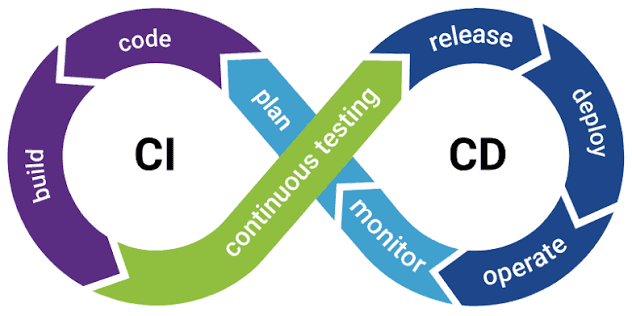
CI/CD Explained: The Complete Guide to Building a Modern Pipeline (2026)
The complete 2026 guide to CI/CD — what continuous integration and continuous delivery/deployment actually mean, how a modern pipeline works stage by stage, the best CI/CD tools, AI's growing role in pipelines, and how to set one up for a real project.