CI/CD Explained: The Complete Guide to Building a Modern Pipeline (2026)
The complete 2026 guide to CI/CD — what continuous integration and continuous delivery/deployment actually mean, how a modern pipeline works stage by stage, the best CI/CD tools, AI's growing role in pipelines, and how to set one up for a real project.
What Is CI/CD, Really?
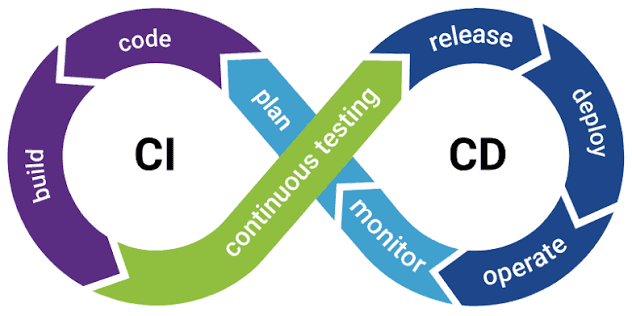
CI/CD stands for Continuous Integration and Continuous Delivery (or Continuous Deployment) — the practice of automating how code moves from a developer's laptop to a live, running application in production. Before CI/CD became standard, releasing software meant manual builds, manual testing, and someone nervously running deployment scripts at midnight. Today, that entire process runs automatically, every time code changes.
At its core, CI/CD answers one question: how do you ship code changes constantly without breaking things? The answer is a pipeline — a defined, automated sequence of steps that every code change passes through before it reaches users.
CI/CD isn't a tool. It's a discipline. The tools just enforce the discipline automatically so humans don't have to remember to do it manually every single time.
Breaking Down the Acronym
Continuous Integration (CI)
Continuous Integration means developers merge their code into a shared, central repository frequently — often multiple times a day — rather than working in isolation for weeks. Every time code is pushed, an automated system immediately builds the project and runs the test suite against it.
The goal is simple: catch integration problems and bugs within minutes of them being introduced, not weeks later when a dozen other changes have piled on top and the bug becomes far harder to trace.
Continuous Delivery (CD)
Continuous Delivery extends CI one step further. Once code passes all automated tests, it's automatically packaged and prepared into a release-ready state — a deployable artifact sitting one click away from production. A human still decides when to actually hit "deploy," but all the manual prep work leading up to that decision is eliminated.
Continuous Deployment (CD)
Continuous Deployment removes the human approval step entirely. If a change passes every stage of the pipeline — build, tests, security scans, quality checks — it's automatically deployed to production, no manual click required. This is the most mature and fastest-moving form of CI/CD, common at companies shipping dozens of times a day.
| Term | What Happens | Human Involvement |
|---|---|---|
| Continuous Integration | Code is merged and tested automatically on every change | Developers write code, review failures |
| Continuous Delivery | Code is automatically built and packaged, ready to release | Human approves final production push |
| Continuous Deployment | Code that passes all checks goes live automatically | None — fully automated release |
Why CI/CD Matters
- Catches bugs earlier — problems surface within minutes of a code change, not weeks into a release cycle
- Reduces release risk — small, frequent changes are far easier to debug and roll back than massive, infrequent releases
- Speeds up delivery — teams can ship features and fixes to users continuously instead of batching them into rare, high-stakes release events
- Removes manual error — automated pipelines don't forget steps, skip tests, or fat-finger a deployment command under pressure
- Builds team confidence — developers can merge and ship without fear because the pipeline is the safety net, not a person's memory
The Stages of a Modern CI/CD Pipeline
While every team's pipeline looks slightly different, most follow the same general sequence from code commit to live production traffic.
Stage 1 — Source Control Trigger
The pipeline begins the moment a developer pushes code or opens a pull request in a system like GitHub, GitLab, or Bitbucket. This event automatically triggers the pipeline to run — no manual kickoff required.
Stage 2 — Build
The code is compiled (for compiled languages) or bundled (for interpreted languages like JavaScript/Python) into a runnable form. If the build fails here — a syntax error, a missing dependency — the pipeline stops immediately and the developer is notified.
Stage 3 — Automated Testing
This is the heart of CI. Multiple layers of tests run automatically:
- Unit tests — verify individual functions or components work correctly in isolation
- Integration tests — verify different parts of the system work together correctly
- End-to-end (E2E) tests — simulate real user flows through the entire application
Stage 4 — Code Quality and Security Scanning
Automated linters check code style and formatting consistency. Static analysis tools scan for common bugs and anti-patterns. Security scanners check for known vulnerabilities in dependencies and flag risky code patterns (like hardcoded secrets or SQL injection risks) before they ever reach production.
Stage 5 — Artifact Packaging
Once code passes every check, it's packaged into a deployable artifact — a Docker container image, a compiled binary, or a build bundle — and stored in a registry, ready to be deployed to any environment.
Stage 6 — Staging Deployment
The artifact is deployed to a staging environment that mirrors production as closely as possible. This is often where final manual QA, exploratory testing, or stakeholder review happens before the change goes live.
Stage 7 — Production Deployment
The final stage pushes the artifact to production, using a deployment strategy chosen to minimize risk to real users (covered in detail below).
Stage 8 — Post-Deployment Monitoring
Once live, monitoring tools track error rates, latency, and system health. If something looks wrong, automated alerts fire, and in mature pipelines, automatic rollback can kick in before most users are ever affected.
Deployment Strategies Inside CI/CD
How you release the new version to production matters just as much as the pipeline that built it. The strategy you choose determines how much risk a bad release carries.
| Strategy | How It Works | Risk Level |
|---|---|---|
| Rolling Deployment | Gradually replaces old instances with new ones, a few at a time | Medium — brief mixed-version period |
| Blue-Green Deployment | New version runs fully alongside the old one; traffic switches instantly once verified | Low — instant rollback by switching back |
| Canary Deployment | New version goes to a small percentage of users first, then expands if healthy | Very low — limited blast radius |
| Big Bang Deployment | Entire user base switches to the new version at once | High — no gradual safety net |
Most mature teams in 2026 default to canary or blue-green deployments for anything customer-facing, reserving rolling or big-bang deployments for lower-risk internal tools.
Top CI/CD Tools in 2026
| Tool | Best For | Hosting Model |
|---|---|---|
| GitHub Actions | Teams already on GitHub wanting tight, native integration | Cloud-hosted (GitHub-managed runners) or self-hosted |
| GitLab CI/CD | Teams using GitLab, wanting CI/CD built directly into the same platform | Cloud or self-hosted |
| Jenkins | Maximum customization and plugin flexibility for complex, legacy setups | Self-hosted |
| CircleCI | Fast, cloud-native pipelines with strong caching and parallelism | Cloud-hosted |
| Harness | Enterprise deployment orchestration with AI-driven risk analysis | Cloud or self-hosted |
| Argo CD | GitOps-style continuous deployment for Kubernetes environments | Self-hosted (runs inside your cluster) |
How AI Is Changing CI/CD Pipelines
By 2026, CI/CD pipelines have moved well beyond "just run the tests." AI now plays an active role at nearly every stage:
- AI code review — automatically reviews every pull request for bugs, security issues, and style problems before a human even looks at it, cutting review time significantly
- AI test generation and maintenance — writes new test cases as code changes and updates existing tests automatically when the UI or logic shifts, reducing test debt
- Predictive test selection — instead of running the entire test suite on every change, AI predicts which specific tests are most likely to catch a regression, cutting CI run time dramatically on large codebases
- Auto-fix on failure — some pipelines detect a failing build, generate a likely fix, and re-run automatically before ever flagging a human
- Deployment risk scoring — analyzes the size, location, and history of a code change to recommend how cautiously it should be rolled out (canary vs. full release)
- Anomaly detection post-deploy — AI-powered monitoring flags unusual error rates or latency spikes faster than static threshold alerts would
The net effect is a pipeline that doesn't just enforce rules mechanically — it makes informed judgment calls about risk, similar to what an experienced release engineer would do, but continuously and at machine speed.
How to Set Up a Basic CI/CD Pipeline (Example with GitHub Actions)
Here's a realistic starting structure for a simple pipeline, conceptually:
- Trigger: Runs automatically on every push to the main branch and every pull request
- Install dependencies: Sets up the project environment (Node.js, Python, etc.)
- Run linter: Checks code style and catches obvious errors early
- Run test suite: Executes unit and integration tests, fails the pipeline if any test fails
- Build artifact: Compiles or bundles the application into a deployable form
- Deploy to staging: Automatically pushes the build to a staging environment for review
- Manual or automatic approval: Depending on whether you're doing Continuous Delivery or Continuous Deployment, either a human approves the release or it proceeds automatically
- Deploy to production: Pushes the release live using your chosen deployment strategy
Most CI/CD platforms let you define this entire flow in a single configuration file that lives alongside your code, versioned just like everything else in the repository.
CI/CD Best Practices
- Keep the pipeline fast — a CI run that takes 30 minutes discourages frequent commits; aim to keep feedback loops under 10 minutes where possible
- Fail fast — run the cheapest, fastest checks (linting, unit tests) before expensive ones (E2E tests, full builds) so failures surface as early as possible
- Never skip staging — even with strong automated tests, a staging environment catches issues that only appear in a production-like setting
- Automate rollback — a pipeline that can deploy automatically should also be able to roll back automatically when monitoring detects a problem
- Keep secrets out of code — use your CI/CD platform's secret management rather than hardcoding credentials anywhere in the repository
- Version your pipeline config — treat your CI/CD configuration as code, reviewed and versioned just like the application itself
- Monitor pipeline health, not just app health — track how often builds fail, how long pipelines take, and where bottlenecks form over time
Common CI/CD Mistakes
- Testing too little, too late — relying on manual QA instead of building out a real automated test suite defeats the purpose of CI entirely
- Overly complex pipelines early on — small teams often over-engineer pipelines with stages they don't need yet, slowing down every single commit
- No staging environment — deploying straight from tests to production skips a critical safety layer
- Ignoring flaky tests — tests that fail inconsistently erode trust in the pipeline and get ignored, defeating their purpose
- All-or-nothing deployments — big-bang releases with no gradual rollout mean a bad change affects 100% of users instantly
Conclusion
CI/CD isn't just a DevOps buzzword — it's the automated backbone that lets modern teams ship software constantly, confidently, and safely. Continuous Integration catches problems the moment they're introduced. Continuous Delivery keeps every change one click from release. Continuous Deployment removes that click entirely once trust in the pipeline is earned. Layer in AI-driven code review, test generation, and risk-aware deployment strategies, and what used to take a dedicated release engineer now runs quietly in the background on every single commit.
Whether you're a solo developer or leading a large engineering team, the principle stays the same: build the pipeline once, and let it protect every release after that — so shipping software becomes routine instead of risky.
Frequently Asked Questions
What does CI/CD stand for?▼
CI/CD stands for Continuous Integration and Continuous Delivery (or Continuous Deployment). Continuous Integration means developers merge code changes frequently into a shared repository, with automated builds and tests running on every change. Continuous Delivery/Deployment means those changes are automatically prepared for release, and in the case of deployment, automatically pushed to production.
What is the difference between continuous delivery and continuous deployment?▼
Continuous Delivery means every code change is automatically built, tested, and packaged into a release-ready state, but a human still manually approves the final push to production. Continuous Deployment goes one step further and automatically releases every change that passes all pipeline checks straight to production, with no manual approval step.
What are the main stages of a CI/CD pipeline?▼
A typical pipeline includes: source control trigger, build, automated testing (unit, integration, end-to-end), code quality and security scanning, artifact packaging, staging deployment, and production deployment, followed by post-deployment monitoring. Not every pipeline uses all stages, but this is the standard sequence.
What is the best CI/CD tool in 2026?▼
It depends on your setup. GitHub Actions is the top choice for teams already on GitHub due to tight integration. Jenkins remains popular for highly customizable, self-hosted pipelines. GitLab CI is ideal if you're already using GitLab. CircleCI and Harness are strong for teams wanting fast, cloud-native pipelines with advanced deployment strategies.