SaaS vs PaaS vs IaaS Explained: The Simple Guide (2026)
A clear, no-fluff breakdown of SaaS, PaaS, and IaaS — what each cloud service model actually means, real-world examples, the key differences, and how to know which one applies to what you're building or using.
Three Letters, Three Very Different Things
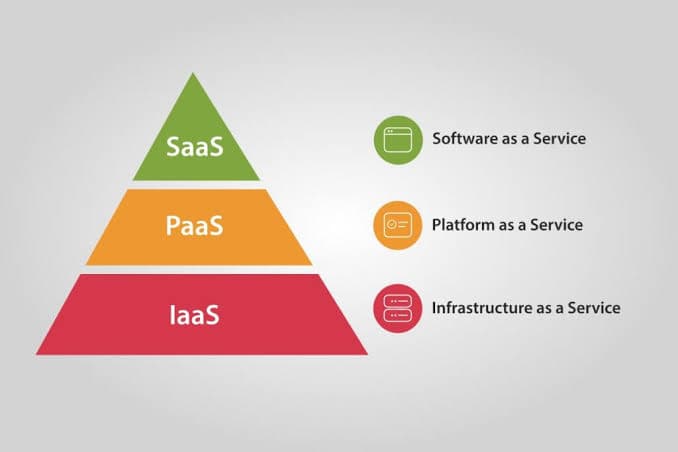
SaaS, PaaS, and IaaS all describe cloud computing service models — but they answer very different questions about how much you manage yourself versus how much the provider handles for you. Understanding the difference matters whether you're choosing business tools or deciding how to deploy your own product.
The simplest way to remember it: IaaS gives you the building blocks, PaaS gives you the workshop, and SaaS gives you the finished product.
IaaS — Infrastructure as a Service
IaaS gives you raw computing infrastructure — virtual servers, storage, and networking — without any physical hardware to manage yourself. You still install the operating system, configure the environment, and manage everything that runs on top of it.
- What you manage: OS, runtime, applications, data, security configuration
- What the provider manages: Physical servers, networking hardware, data centers
- Examples: AWS EC2, Google Compute Engine, Microsoft Azure Virtual Machines, DigitalOcean Droplets
IaaS is the right choice when you need maximum control — custom server configurations, specific compliance requirements, or infrastructure that doesn't fit a standard platform's constraints.
PaaS — Platform as a Service
PaaS gives you a ready-to-use platform for building and deploying applications without managing servers or infrastructure at all. You focus purely on writing code — the provider handles the operating system, runtime, and scaling underneath it.
- What you manage: Your application code and data
- What the provider manages: Servers, OS, runtime, scaling, patching
- Examples: Vercel, Heroku, Render, Google App Engine, Railway
PaaS is ideal for developers who want to ship fast — push your code and the platform handles deployment, scaling, and infrastructure decisions automatically.
SaaS — Software as a Service
SaaS delivers fully finished software that you access directly, usually through a browser, with zero setup or maintenance on your end. You're not building anything — you're just using it.
- What you manage: Just your account and data usage
- What the provider manages: Literally everything else — servers, code, updates, security
- Examples: Gmail, Slack, Notion, Netflix, Salesforce, QuickBooks
SaaS is what most people use every day without thinking about it — ready-made tools that solve a specific problem the moment you sign up.
Side-by-Side Comparison
| IaaS | PaaS | SaaS | |
|---|---|---|---|
| What you get | Virtual servers & infrastructure | A platform to deploy apps | Finished, ready-to-use software |
| Who it's for | DevOps teams, system admins | Developers building products | End users and businesses |
| Setup effort | High — configure everything | Medium — deploy code, done | Low — just sign up and use |
| Example | AWS EC2 | Vercel | Slack |
How They Fit Together
These three layers actually stack on top of each other. A SaaS product like Slack is very likely built and deployed on top of PaaS or IaaS infrastructure behind the scenes. PaaS platforms like Vercel run on top of IaaS providers like AWS. As a business, you'll often use all three at once for different purposes:
- SaaS for daily operations — Slack for chat, Notion for docs, QuickBooks for accounting
- PaaS for deploying your own product quickly — Vercel or Render hosting your web app
- IaaS for custom backend infrastructure at scale — AWS servers running your database and core services
Conclusion
SaaS, PaaS, and IaaS all answer the same underlying question — how much do you want to manage versus how much do you want handed to you — just at different layers of the stack. Use SaaS when you want a solved problem. Use PaaS when you want to build fast without touching infrastructure. Use IaaS when you need full control over how everything runs underneath. Most growing businesses end up using a mix of all three — and that's exactly how it's meant to work.
Frequently Asked Questions
What is the simplest way to understand SaaS, PaaS, and IaaS?▼
Think of it like pizza. IaaS gives you the kitchen, oven, and ingredients — you cook everything yourself. PaaS gives you a pizza-making station with dough and sauce ready — you just add toppings. SaaS gives you the finished pizza delivered to your door — you just eat it.
What is an example of SaaS, PaaS, and IaaS?▼
SaaS: Gmail, Slack, Netflix — ready-to-use software you access through a browser. PaaS: Heroku, Vercel, Google App Engine — platforms where you deploy your code without managing servers. IaaS: AWS EC2, Google Compute Engine, Microsoft Azure VMs — raw virtual servers and infrastructure you configure yourself.
Which one should a startup use — SaaS, PaaS, or IaaS?▼
It depends on what you're building. If you're building a product to sell, you'll likely deploy it on a PaaS (like Vercel or Render) for speed, or IaaS (like AWS) for more control as you scale. If you just need business tools to run your company, you'll use SaaS products like Notion, Slack, or QuickBooks.
Who manages what in SaaS vs PaaS vs IaaS?▼
In IaaS, you manage the operating system, applications, and data while the provider manages physical hardware and networking. In PaaS, the provider also manages the OS and runtime, so you only handle your application and data. In SaaS, the provider manages everything — you just use the software.
Related Blogs

Types of Software We Build: A Simple Guide to Choosing the Right One (2026)
A concise look at the different kinds of software businesses actually need in 2026 — from websites and web apps to mobile apps, SaaS products, automation tools, and custom internal systems — and how to know which one fits your business.
The Complete AI Ecosystem to Build Any Software in 2026 — Design, Development, Automation & CI/CD
The complete AI-powered software development ecosystem for 2026 — every category of AI tool you need to design, build, automate, test, and ship software, from AI UI design tools to AI coding agents, automation platforms, and AI-driven CI/CD pipelines.