How to Manage Your Complete Restaurant by Building Software (Full Guide)
How to manage a complete restaurant by building software: a waiter app that takes orders, a kitchen screen that shows them to the cooks, a manager dashboard that monitors payments and bills, all connected to one central database. Plus how the Funtwitch developer team builds the full system end to end.
Running a Restaurant Is Hard Without the Right System
A busy restaurant has many things happening at the same time. Customers are ordering. Cooks are making food. Waiters are running between tables. The manager is trying to keep track of money, stock, and staff. If all of this is done on paper or in many separate tools, mistakes happen every day.
You may know these problems already:
- A waiter writes an order on paper, and the kitchen cannot read it
- An order gets lost, and the customer waits too long
- The bill does not match what the customer ordered
- The manager only knows the day's sales after closing
- Nobody knows which items are running out until it is too late
- Cash and payments are hard to check, so mistakes or theft are hard to find
The answer is a complete restaurant management system. In this guide, we explain how it works, what parts it has, and how you can build one for your own restaurant. We also show how the Funtwitch developer team builds this kind of system end to end.
What Is a Complete Restaurant Management Ecosystem?
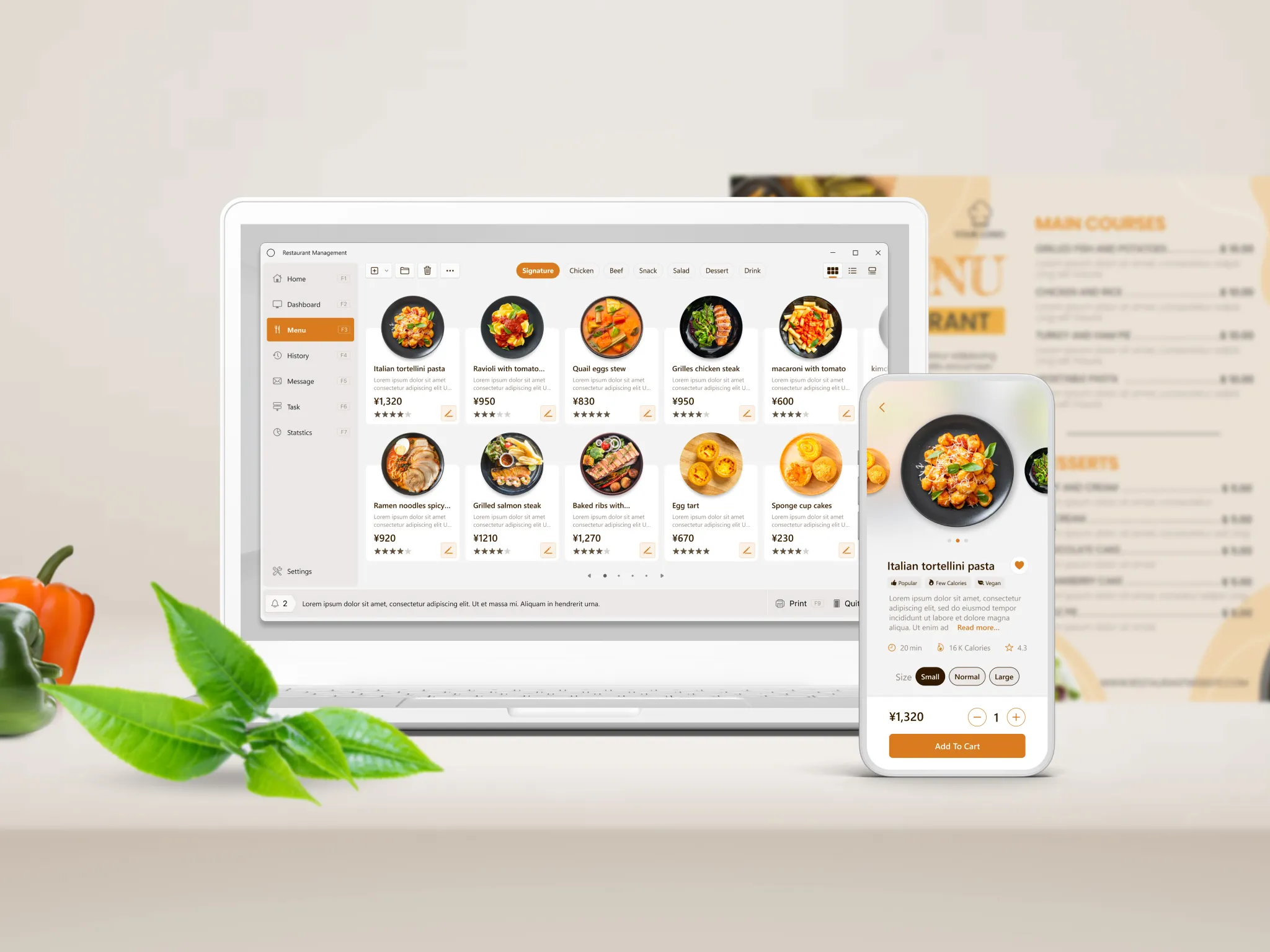
A restaurant management ecosystem is a set of connected apps and screens that run your whole restaurant. Each person uses the part made for their job, but everything is connected to one central database.
Here is the simple idea:
- The waiter uses an app on a phone or tablet to take orders at the table
- The kitchen sees each order on a screen the moment it is placed
- The manager watches orders, payments, and sales live on a dashboard
- Billing is made automatically from the order, with taxes and discounts
- Payments are saved in the system so nothing is missed
- One central database holds all of this, so everyone sees the same truth
Think of the central database as the brain of the restaurant. Every app talks to it. When the waiter saves an order, the kitchen sees it. When the cook marks it ready, the waiter is told. When the customer pays, the manager sees it. Nobody has to shout, run, or guess.
The Journey of One Order, From Table to Bill
Let us follow one order through the system. This is the heart of the whole idea.
| Step | What Happens | Who Uses It |
|---|---|---|
| 1. Guests sit down | The table is marked as occupied in the system | Waiter |
| 2. Order is taken | The waiter picks items from the menu on the app, adds notes like no onion, and sends the order | Waiter app |
| 3. Order is saved | The order is saved in the central database with table number, time, and waiter name | Central database |
| 4. Kitchen sees it | The new order appears on the kitchen screen right away, with notes and table number | Kitchen display |
| 5. Cooking starts | The cook marks the order as preparing, then ready | Kitchen display |
| 6. Waiter is told | The waiter gets a message that the food is ready to serve | Waiter app |
| 7. Extra items | If guests order more, the waiter adds it to the same table and the kitchen sees only the new items | Waiter app and kitchen display |
| 8. Bill is created | The system makes the bill from the order, with taxes, service charge, and discounts | Billing |
| 9. Payment is taken | The guest pays by cash, card, or online. The payment is saved | Billing and payments |
| 10. Manager sees everything | The sale, payment, and table status all update on the dashboard | Manager dashboard |
All ten steps happen without paper, without shouting across the room, and without anyone typing the same thing twice.
The Main Parts of the System
1. Waiter App
This is the app your waiters carry. It runs on a phone or tablet.
- See all tables and which ones are free, busy, or waiting for the bill
- Pick items from the menu with photos, prices, and options
- Add notes, like extra spicy or no nuts
- Send the order to the kitchen with one tap
- Add more items to a running table
- Get a message when food is ready
- Ask for the bill or transfer a table
2. Kitchen Display Screen
This is a screen in the kitchen that replaces paper slips. Cooks see orders in the order they came in.
- New orders appear instantly with a sound or color change
- Each order shows table number, items, and notes
- Cooks can mark items as preparing or ready
- Orders that wait too long can be highlighted
- Different stations, like grill, bar, or dessert, can see only their own items
3. Manager Dashboard
This is where the manager watches the whole restaurant, on a computer or phone, even from outside.
- See live orders and table status
- See all payments as they happen
- Check today's sales, by hour, by item, and by waiter
- See discounts, cancelled items, and refunds, and who did them
- Check which dishes sell the most and which sell the least
- Manage the menu, prices, and staff accounts
4. Billing and Payments
This part handles the money side of every order.
- Create the bill automatically from the order
- Add taxes, service charge, and tips
- Apply discounts and offers with proper permission
- Split the bill equally or by items
- Accept cash, cards, and online payments
- Print or send the receipt by message or email
- Save every payment in the central database for tracking
- Make a daily closing report so cash and sales match
5. Menu and Table Management
The manager can change the menu without calling a developer. Add a new dish, change a price, mark an item as sold out, or set special items for a day. Tables can be set up to match your real floor plan.
6. Inventory and Stock
Every time an item is sold, the system can reduce the stock of its ingredients. The manager sees what is running low and gets an alert before you run out. This helps reduce waste and stops you from selling dishes you cannot make.
7. Customer Side: QR Menu, Online Orders, and Reservations
Once the core system works, you can add customer-facing features:
- A QR code on each table so guests can see the menu and order from their phone
- Online ordering for takeaway and delivery
- Table reservations
- Customer records and loyalty points
These all connect to the same central database, so online orders show on the kitchen screen just like table orders.
8. Staff Management
Each staff member gets their own login with the right permissions. A waiter can take orders but cannot give big discounts. A cook can see the kitchen screen but not the sales. Only the manager and owner see reports. This keeps the system safe and makes it clear who did what.
9. Reports and AI Features
With all your data in one place, you can do smart things:
- Daily, weekly, and monthly sales reports
- Best and worst selling items
- Busiest hours, so you can plan staff
- AI that predicts how much stock you need
- AI that suggests menu changes based on what sells
- AI assistant for the manager, so you can ask questions like how much did we sell last Friday
Why One Central Database Matters So Much
Many restaurants use different tools for different jobs. One tool for orders, another for billing, another for stock, and a spreadsheet for sales. The problem is that these tools do not talk to each other. Someone has to copy information by hand, and mistakes happen.
With one central database:
- Everyone sees the same information. No old numbers, no mismatched bills.
- Nothing is typed twice. The order made by the waiter becomes the kitchen ticket, the bill, and the sales record automatically.
- The manager sees the truth live. No waiting until the end of the day to know what happened.
- Mistakes and theft are easier to find. Every order, discount, and payment is recorded with time and name.
- It is easy to grow. You can add a new branch, a new app, or online ordering, and it all connects to the same data.
- Reports are accurate. Because all data is in one place, your reports are based on the full picture.
How the Funtwitch Developer Team Builds This End to End
Building a complete restaurant system is not one small job. It needs a mobile app, a kitchen screen, a manager dashboard, a strong backend, a central database, payments, and security, all working together. This is exactly the kind of project where a full team helps.
The Funtwitch developer team is a small freelancer company. Our developers first worked as independent freelancers, and each one has a strong skill in one area. Now we work together as one team. For a restaurant system, that means you do not need to find a mobile developer, a backend developer, and a designer separately. We build the complete ecosystem for you, end to end.
What We Offer
- Mobile app development: We build the waiter app for Android and iPhone, easy to use even in a busy restaurant, and ready to publish on Google Play and the Apple App Store if you need it.
- Website development: We build the manager dashboard, the kitchen display, your restaurant website, and online ordering pages, fast and clean on every screen.
- Full stack development: We build both the screens people see and the backend behind them, including the real-time updates that send orders from the waiter to the kitchen instantly.
- SaaS development: If you want to run many restaurants, or sell your system to other restaurants, we build it as a SaaS product with separate accounts for each restaurant, subscription plans, and an owner dashboard.
- AI integration: We add AI features such as sales prediction, stock suggestions, menu insights, and an AI assistant for the manager.
All of our work is built to be secure and powered by AI. We plan the security from day one, which matters a lot for software that handles payments and customer data.
What We Build for Your Restaurant, Step by Step
- Understanding your restaurant. We learn how your restaurant works: how many tables, how many staff, what kind of kitchen, what payments you take, and what problems you want to solve.
- The central database and backend. We design the brain of the system first, so every app uses the same clean data.
- The waiter app. Simple, fast, and made for people who are always moving.
- The kitchen display. A clear screen that shows orders instantly and lets cooks update their status.
- The manager dashboard. Live monitoring of orders, payments, sales, and staff.
- Billing and payments. Automatic bills, taxes, discounts, split bills, and payment gateways, connected properly so every payment is tracked.
- Printer and device setup. Connecting kitchen printers, bill printers, and tablets, if you use them.
- Inventory, reports, and AI. Stock tracking, clear reports, and smart suggestions.
- Testing and training. We test the full flow from table to bill, and help your staff learn to use it.
- Launch and support. We help you go live and stay with you for fixes and new features afterward.
Hire Only What You Need
You do not have to build everything at once, and you do not have to hire a big team for every job. With Funtwitch, you choose what fits your project.
- Already have a system but need a better waiter app? You can hire a mobile app developer.
- Need a manager dashboard only? You can hire a frontend or full stack developer.
- Need a strong backend and database for your existing apps? You can hire a backend developer.
- Want everything built from zero? You get our complete skilled team, working together to match your project timeline.
How to Start With Funtwitch
Starting is very simple. There are only three steps.
- Go to the Hire Developer page on the Funtwitch website.
- Fill in the basic form. Tell us a little about yourself and your restaurant. You can also tell us what you need, such as the full system, only the waiter app, only the dashboard, or a backend developer.
- The developer team connects with you. In the first talk, we listen to how your restaurant works, give you suggestions, tell you which developer or team fits your project best, and explain how we can match your timeline.
Why Restaurant Owners Choose the Funtwitch Developer Team
- One team for the whole system. Waiter app, kitchen screen, dashboard, backend, and payments are built by people who work together.
- Built around your restaurant. We start from how your restaurant works, not from a fixed template.
- One central database from the start. We plan the data first, so everything connects cleanly and can grow.
- Hire exactly what you need. One developer for one part, or the complete team for the full system.
- Security built in. Staff logins, permissions, payments, and customer data are planned during the build, not added later.
- AI where it helps. Smart reports and stock suggestions that save real time and money.
- Effort to match your timeline. The complete team plans the work so different parts move together.
- Easy start. Go to the Hire Developer page, fill in a basic form, and we connect with you.
- Support after launch. A team behind you for updates and new features, so the project does not depend on one person.
The Technology Behind the System, in Simple Words
You do not need to understand the technology to build your restaurant system, but it helps to know the main pieces.
| Piece | What It Does |
|---|---|
| Mobile app | The waiter app on phones and tablets, built for Android and iPhone |
| Web app | The manager dashboard and kitchen display, which open in a browser on any device |
| Backend | The server that handles all the rules, such as who can do what, how bills are calculated, and where data goes |
| Central database | The one place where orders, menus, payments, stock, and staff records are saved |
| Real-time updates | The technology that makes a new order appear on the kitchen screen instantly, without refreshing |
| Payment gateway | The connection that lets guests pay by card or online and records every payment |
| Printer connection | Sends kitchen tickets and bills to your printers, if you use them |
| Security and roles | Makes sure each person can only see and do what their job allows |
Billing and Payments: Getting the Money Side Right
The money side is where mistakes cost the most, so it deserves extra care. A good restaurant billing system should handle:
- Correct taxes for your country and region
- Service charge and tips in the way your restaurant uses them
- Discounts and offers with permission rules, so only the right people can give them
- Split bills between guests, equally or by item
- Many payment types such as cash, card, and online payment, in the same bill if needed
- Receipts that are printed, sent by message, or sent by email
- Refunds and cancelled items that are recorded with a reason and a name
- Daily closing that shows total sales, payments by type, and any difference in cash
Because every action is saved in the central database, the manager can see exactly what happened with every bill. This builds trust with customers and helps protect the restaurant.
What the Manager Can Monitor
One of the biggest benefits of this system is that the manager sees the whole restaurant clearly, without standing in the room all day.
- Live orders: What is being cooked right now and how long it has been waiting
- Table status: Which tables are free, busy, or waiting for the bill
- Payments: Every payment as it comes in, with method and amount
- Sales: Totals by hour, day, week, month, waiter, and item
- Discounts and cancellations: Who gave or cancelled what, and when
- Stock: What is running low and what needs to be ordered
- Staff activity: Who took how many orders and how fast the kitchen is working
- Branches: If you have more than one restaurant, all of them in one view
Buy Ready-Made or Build Custom?
Both options can work. The right choice depends on your restaurant.
| Question | Ready-Made Software | Custom Software |
|---|---|---|
| Start time | Very quick | Takes longer because it is built for you |
| Fit for your workflow | You change how you work to fit the software | The software is built to fit how you work |
| Your own brand and app | Usually limited | Fully your own brand and design |
| Special features | Only what the company offers | Any feature you need |
| Many branches | Depends on the plan | Built to match your branch setup |
| Monthly fees | Usually a monthly fee for as long as you use it | No fees for a product you own, though you pay for the build and upkeep |
| Selling it to other restaurants | Not possible | Possible, if you build it as a SaaS product |
| Best for | Simple, standard restaurants that want to start fast | Restaurants with special needs, many branches, or plans to grow or sell the system |
If you are not sure, talk to a developer team before deciding. A short call can save you from picking the wrong path.
A Smart Way to Build It in Phases
You do not need to build everything on day one. A smart way is to build in phases, so you start using the core system quickly and add more over time.
- Phase 1: The core system. Menu, tables, waiter app, kitchen display, billing, and payments, all on the central database. This alone fixes the biggest daily problems.
- Phase 2: Manager control. A full dashboard, reports, staff permissions, and stock tracking.
- Phase 3: Customer features. QR menu ordering, online ordering, reservations, and loyalty points.
- Phase 4: Smart features. AI reports, stock prediction, menu suggestions, and a manager AI assistant.
- Phase 5: Growth. More branches, or turning the system into a SaaS product for other restaurants.
Because everything uses one central database from the start, each new phase connects easily and nothing needs to be rebuilt.
Common Mistakes to Avoid
- Making the waiter app too complicated. Waiters are busy. Every extra tap slows the restaurant down.
- Using many separate tools. Different tools that do not share data bring back the same old mistakes.
- Ignoring staff permissions. Everyone with full access is a risk to your money and data.
- Skipping security. A system that handles payments and customer data must be built safely. If you use AI tools to build it, have a developer review the code before launch.
- Not planning for taxes and local rules. Billing must match the rules where you work.
- No training for staff. Even the best system fails if people do not know how to use it.
- Building everything at once. Start with the core system, then grow in phases.
- No backup plan. Your data is the heart of your restaurant, so it must be backed up safely.
The Bottom Line
Managing a restaurant with software is about connecting everyone with one system. The waiter takes the order on an app. The kitchen sees it instantly. The manager watches payments and sales live. Bills are made automatically. And all of it runs on one central database, so everyone sees the same information and nothing gets lost.
It is a big project, but it is easier when one team builds the whole ecosystem end to end. The Funtwitch developer team offers mobile app development, website development, full stack development, SaaS, and AI integration, so we can build every part of your restaurant system together, or just the part you need. Go to the Hire Developer page, fill in a basic form, and our team will connect with you.
Frequently Asked Questions
What is a restaurant management system?▼
A restaurant management system is software that connects everything in your restaurant in one place. The waiter takes orders on an app, the kitchen sees them on a screen, the manager watches sales and payments live, and bills are made automatically. All of this runs on one central database, so everyone sees the same information.
How does a waiter's order reach the kitchen?▼
The waiter enters the order on a phone or tablet app. The app saves it to the central database right away, and the kitchen screen shows the new order at the same moment. The cook can then mark it as preparing and ready, and the waiter gets a message when the food can be served.
Why does a restaurant need one central database?▼
One central database means every part of your restaurant uses the same information. Orders, tables, payments, stock, and staff records all live in one place. This avoids mistakes like a kitchen not seeing an order, a bill not matching the order, or a manager seeing old numbers.
Can a manager watch everything from one dashboard?▼
Yes. A manager dashboard can show live orders, table status, payments, daily sales, discounts, cancelled items, and staff activity. The manager can check it from a phone or computer, even when not inside the restaurant.
Related Blogs

How to Find a Freelancer or Developer Team to Build Your Software (Simple Guide)
A simple guide to finding a freelancer or developer team to build your software. Learn where to look, what each option is good at, and see the complete Funtwitch developer team, where you can hire just a frontend developer, just a backend developer, or a full skilled team that works to match your project timeline.
Payment Gateway Integration in SaaS: Stripe, PayPal, Razorpay & Multi-Gateway Architecture
How to integrate payment gateways like Stripe, PayPal, and Razorpay into a SaaS product, why most growing SaaS platforms end up using more than one, and how to architect a multi-gateway payment layer without duplicating logic.